DataDome
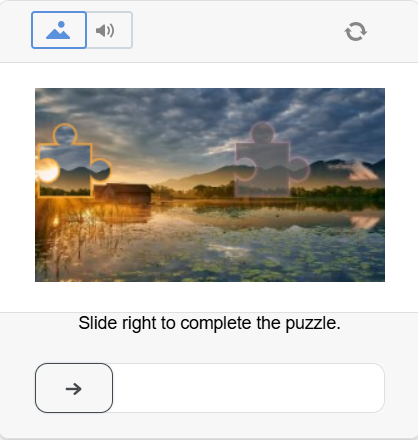
This type of captcha usually requires the user to solve a puzzle by moving a slider for verification.
-
Use your own proxies to perform this task.
-
If your proxy uses IP-based authorization, you must whitelist the address 65.21.190.34.
-
After solving, you will receive special cookies that must be added to the browser.
Request parameters
type<string>requiredCustomTask
class<string>requiredDataDome
websiteURL<string>requiredThe main page URL where the captcha is solved.
captchaUrl (inside metadata)<string>required"captchaUrl" - link to the captcha. Usually in the format: "https://geo.captcha-delivery.com/captcha/?initialCid=...".
datadomeCookie (inside metadata)<string>requiredYour DataDome cookies. Can be obtained from the page using document.cookie (if cookies do not have the HttpOnly flag), in the request header Set-Cookie: "datadome=...", or directly from the HTML code initialCid (see examples on how to find datadomeCookie).
datadomeVersion (inside metadata)<string>optionalDataDome solving method version. If set to "new", the updated solving method is used with support for both i.js and c.js scripts (see details below). If the parameter is not specified, the legacy solving method is applied, which supports only i.js.
proxyType<string>requiredhttp - standard http/https proxy;
https - use this only if "http" does not work (required for some custom proxies);
socks4 - socks4 proxy;
socks5 - socks5 proxy.
proxyAddress<string>requiredIPv4/IPv6 proxy address. Not allowed:
- transparent proxies (where the client IP is visible);
- proxies on local machines.
proxyPort<integer>requiredProxy port.
proxyLogin<string>requiredProxy server login.
proxyPassword<string>requiredProxy server password.
userAgent<string>optionalBrowser User-Agent.
Pass only a valid UA from Windows OS. Currently it is: userAgentPlaceholder
Create task method
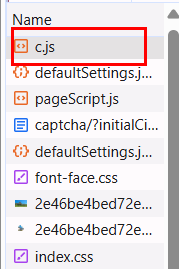
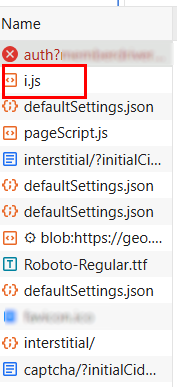
During page loading, DataDome may use one of two scripts: c.js or i.js.
Before solving, check which script is loaded (DevTools → Network / HTML).
Option with c.js:
Option with i.js:
https://api.capmonster.cloud/createTask
Request
{
  "clientKey": "API_KEY",
  "task": {
    "type": "CustomTask",
    "class": "DataDome",
    "websiteURL": "https://example.com",
    "userAgent": "userAgentPlaceholder",
    "metadata": {
      "captchaUrl": "https://geo.captcha-delivery.com/interstitial/?initialCid=AHrlqAAAAAMA9UvsL58YLqIAXNLFPg%3D%3D&hash=C0705ACD75EBF650A07FF8291D3528&cid=7sfa5xUfDrR4bQTp1c2mhtiD7jj9TXExcQypjdNAxKVFyIi1S9tE0~_mqLa2EFpOuzxKcZloPllsNHjNnqzD9HmBA4hEv7SsEyPYEidCBvjZEaDyfRyzefFfolv0lAHM&referer=https%3A%2F%2Fwww.example.com.au%2F&s=6522&b=978936&dm=cm",
      "datadomeCookie": "datadome=VYUWrgJ9ap4zmXq8Mgbp...64emvUPeON45z",
      "datadomeVersion": "new"
    },
    "proxyType": "http",
    "proxyAddress": "123.45.67.89",
    "proxyPort": 8080,
    "proxyLogin": "proxyUsername",
    "proxyPassword": "proxyPassword"
  }
}
Response
{
  "errorId":0,
  "taskId":407533072
}
Get task result method
Use the getTaskResult method to get the solved DataDome captcha.
https://api.capmonster.cloud/getTaskResult
Request
{
  "clientKey":"API_KEY",
  "taskId": 407533072
}
Response
{
  "errorId": 0,
  "status": "ready",
  "solution": {
    "domains": {
      "www.example.com": {
        "cookies": {
          "datadome": "P1w0VnjFcTFslfps0J4FaPpY_QPbPBW4MeYxj4LW~pztIfJiSSuBPr8oQTUHzdrfgv137FbOBd3kCUOOgny7LhIkhm5e1qdtzYM4s2e46U_qfERK4KiCy22MOSIDsDyh"
        },
        "localStorage": null
      }
    },
    "url": null,
    "fingerprint": null,
    "headers": null,
    "data": null
  }
}
How to find datadomeCookie
Using Developer Tools
Option 1:
-
Open the DataDome-protected site in a browser (Chrome, Firefox).
-
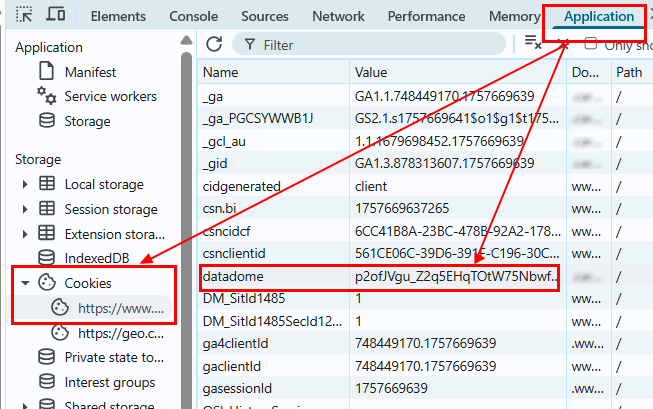
Press F12 → go to the Application tab → Cookies.
-
Find the domain of the site (e.g., www.example.com).
Among the cookies, look for the datadome key — this is the required datadomeCookie.
Option 2:
-
Open the site where the DataDome captcha triggers.
-
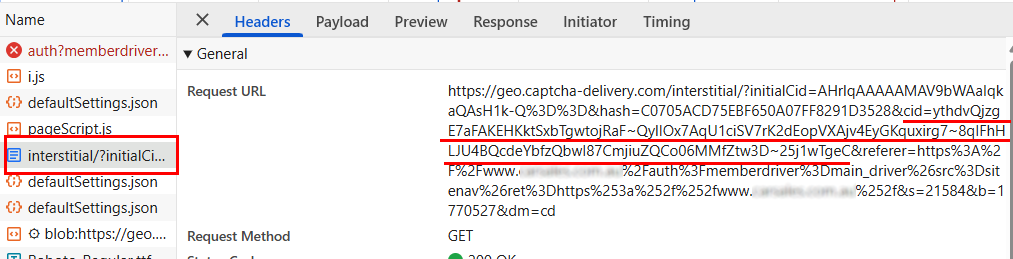
Go to DevTools → Network, reload the page, and find the request loading the page with
initialCid.
Example URL:
https://geo.captcha-delivery.com/interstitial/?initialCid=...&hash=...&cid=...
or:
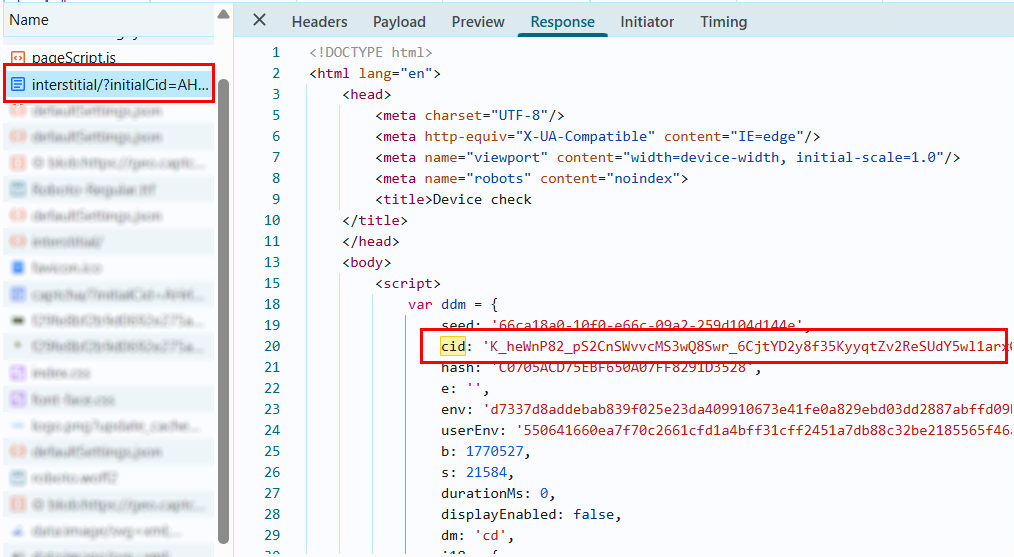
- Open the Response of this request. In the HTML code, find the object:
var ddm = { ... };
- Inside this object, locate the
cidparameter. Its value is the currentdatadomeCookie.
Option 3:
-
Open the site where the DataDome captcha triggers.
-
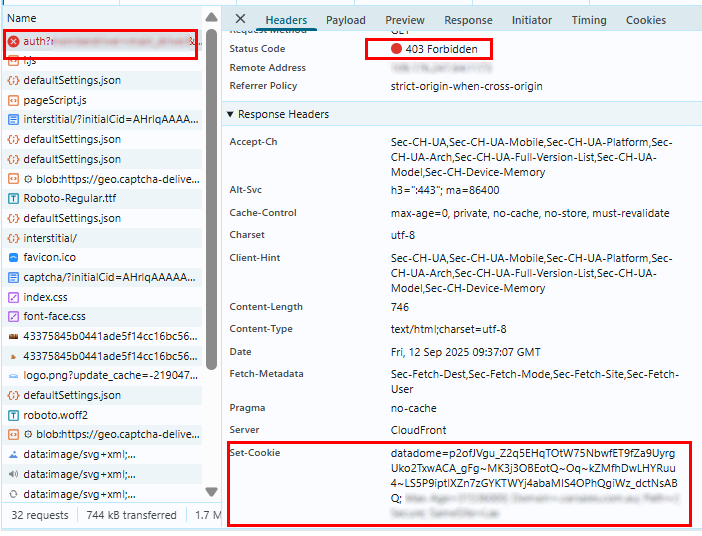
Go to DevTools → Network, reload the page, and find a request with 403 status.
-
Go to the Headers → Response Headers tab. In the headers, find
Set-Cookie:and copy the value of thedatadomeparameter (datadome=<value>).
Example of automatic DataDome solving
The examples below are provided for informational purposes and to demonstrate the general logic.
Since websites differ in protection mechanisms, request structures, and parameters, these solutions may require additional adaptation and testing for a specific site.
- Node.js
- Python
Show code
// npm install axios cheerio https-proxy-agent

import axios from "axios";
import * as cheerio from "cheerio";
import { URL } from "url";
import { HttpsProxyAgent } from "https-proxy-agent";

// ======================================================
// SETTINGS
// ======================================================

// Enables/disables detailed logging output
// Used only for development convenience and debugging
const DEBUG = true;

const CAPMONSTER_API_KEY = "YOUR_API_KEY"; // Specify your CapMonster Cloud API key
const PAGE_URL = "https://www.example.com/"; // Specify the URL of the page where DataDome is triggered

const USER_AGENT =
  "userAgentPlaceholder";

const PROXY_URL = "http://login:pass@address:port";

const CREATE_TASK = "https://api.capmonster.cloud/createTask";
const GET_RESULT = "https://api.capmonster.cloud/getTaskResult";

const MAX_WAIT = 120000;

// ======================================================
// DEBUG LOGGER
// ======================================================

function log(title, data = null) {
  if (!DEBUG) return;

  console.log(`\n${"=".repeat(25)} ${title} ${"=".repeat(25)}`);

  if (typeof data === "object") console.log(JSON.stringify(data, null, 2));
  else if (data) console.log(data);

  console.log("=".repeat(70));
}

// ======================================================
// DD OBJECT EXTRACTION
// ======================================================

function extractDD(html) {
  const $ = cheerio.load(html);
  const scripts = $("script").toArray();

  for (const s of scripts) {
    const text = $(s).html();
    if (text && text.includes("var dd=")) {
      try {
        const raw = text.split("var dd=")[1].split(";")[0].replace(/'/g, '"');
        return JSON.parse(raw);
      } catch (e) {
        return null;
      }
    }
  }

  return null;
}

// ======================================================
// CAPTCHA URL BUILDING
// ======================================================

function buildCaptchaUrl(dd) {
  const base = `https://${dd.host}/captcha/`;

  const params = new URLSearchParams({
    initialCid: dd.cid,
    hash: dd.hsh,
    cid: dd.cookie,
    t: dd.t,
    referer: PAGE_URL,
    s: dd.s,
    dm: "cd",
  });

  if (dd.e) params.append("e", dd.e);

  return base + "?" + params.toString();
}

// ======================================================
// WORKING WITH CAPMONSTER CLOUD
// ======================================================

async function createTask(payload) {
  log("CREATE TASK REQUEST", payload);

  const { data } = await axios.post(CREATE_TASK, payload);

  log("CREATE TASK RESPONSE", data);

  return data.taskId;
}

async function waitResult(taskId) {
  const start = Date.now();

  while (true) {
    if (Date.now() - start > MAX_WAIT) throw new Error("CapMonster timeout");

    await new Promise((r) => setTimeout(r, 3000));

    const { data } = await axios.post(GET_RESULT, {
      clientKey: CAPMONSTER_API_KEY,
      taskId,
    });

    if (data.status === "processing") {
      console.log("... solving");
      continue;
    }

    if (data.status === "ready") return data.solution;

    if (data.errorId) throw new Error(JSON.stringify(data));
  }
}

// ======================================================
// MAIN SOLVER
// ======================================================

async function solveDataDome() {
  console.log("\nDataDome → CapMonster solver started (HTTP mode)\n");

  let agent = null;
  let parsedProxy = null;

  if (PROXY_URL) {
    parsedProxy = new URL(PROXY_URL);
    agent = new HttpsProxyAgent(PROXY_URL);
  }

  // 1. First request
  console.log("Opening page...");

  const response = await axios.get(PAGE_URL, {
    headers: {
      "User-Agent": USER_AGENT,
      Accept:
        "text/html,application/xhtml+xml,application/xml;q=0.9,image/webp,*/*;q=0.8",
      "Accept-Language": "en-US,en;q=0.9",
      "Cache-Control": "no-cache",
      Pragma: "no-cache",
      "Upgrade-Insecure-Requests": "1",
    },
    httpsAgent: agent,
    proxy: false, // important when using httpsAgent
    validateStatus: () => true,
  });

  const html = response.data;

  log("STATUS", response.status);

  const dd = extractDD(html);

  if (!dd) {
    console.log("No DataDome detected.");
    return;
  }

  log("DD OBJECT", dd);

  if (dd.t === "bv") {
    console.log("Proxy banned. Change proxy.");
    return;
  }

  // 2. Build captcha URL
  const captchaUrl = buildCaptchaUrl(dd);
  log("CAPTCHA URL", captchaUrl);

  //  3. Create task in CapMonster Cloud
  const task = {
    type: "CustomTask",
    class: "DataDome",
    websiteURL: PAGE_URL,
    userAgent: USER_AGENT,
    metadata: {
      captchaUrl,
      datadomeCookie: `datadome=${dd.cookie}`,
      datadomeVersion: "new",
    },
  };

  if (PROXY_URL) {
    task.proxyType = "http";
    task.proxyAddress = parsedProxy.hostname;
    task.proxyPort = parseInt(parsedProxy.port);
    task.proxyLogin = parsedProxy.username;
    task.proxyPassword = parsedProxy.password;
  }

  const payload = {
    clientKey: CAPMONSTER_API_KEY,
    task,
  };

  const taskId = await createTask(payload);

  if (!taskId) {
    console.log("Failed to create task.");
    return;
  }

  const solution = await waitResult(taskId);

  log("SOLUTION", solution);

  console.log("\nDataDome solved successfully.\n");
}

solveDataDome().catch(console.error);
Show code (Node.js + Playwright)
// npm install axios cheerio playwright

import axios from "axios";
import * as cheerio from "cheerio";
import { chromium } from "playwright";
import { URL } from "url";

// ======================================================
// SETTINGS
// ======================================================

// Enables/disables detailed logging output
// Used only for development convenience and debugging
const DEBUG = true;

const CAPMONSTER_API_KEY = "YOUR_API_KEY"  // Specify your CapMonster Cloud API key
const PAGE_URL = "https://www.example.com/" // Specify the URL of the page where DataDome is triggered

const USER_AGENT =
  "userAgentPlaceholder";

const PROXY_URL = "http://login:pass@address:port" // Specify your proxy

const CREATE_TASK = "https://api.capmonster.cloud/createTask";
const GET_RESULT = "https://api.capmonster.cloud/getTaskResult";

const MAX_WAIT = 120000;

// ======================================================
// DEBUG LOGGER
// ======================================================

function log(title, data = null) {
  if (!DEBUG) return;

  console.log(`\n${"=".repeat(25)} ${title} ${"=".repeat(25)}`);

  if (typeof data === "object") console.log(JSON.stringify(data, null, 2));
  else if (data) console.log(data);

  console.log("=".repeat(70));
}

// ======================================================
// DD OBJECT EXTRACTION
// ======================================================

function extractDD(html) {
  const $ = cheerio.load(html);
  const scripts = $("script").toArray();

  for (const s of scripts) {
    const text = $(s).html();
    if (text && text.includes("var dd=")) {
      try {
        const raw = text.split("var dd=")[1].split(";")[0].replace(/'/g, '"');
        return JSON.parse(raw);
      } catch (e) {
        return null;
      }
    }
  }

  return null;
}

// ======================================================
// CAPTCHA URL BUILDING
// ======================================================

function buildCaptchaUrl(dd) {
  const base = `https://${dd.host}/captcha/`;

  const params = new URLSearchParams({
    initialCid: dd.cid,
    hash: dd.hsh,
    cid: dd.cookie,
    t: dd.t,
    referer: PAGE_URL,
    s: dd.s,
    dm: "cd",
  });

  if (dd.e) params.append("e", dd.e);

  return base + "?" + params.toString();
}

// ======================================================
// WORKING WITH CAPMONSTER CLOUD
// ======================================================

async function createTask(payload) {
  log("CREATE TASK REQUEST", payload);

  const { data } = await axios.post(CREATE_TASK, payload);

  log("CREATE TASK RESPONSE", data);

  return data.taskId;
}

async function waitResult(taskId) {
  const start = Date.now();

  while (true) {
    if (Date.now() - start > MAX_WAIT) throw new Error("CapMonster timeout");

    await new Promise((r) => setTimeout(r, 3000));

    const { data } = await axios.post(GET_RESULT, {
      clientKey: CAPMONSTER_API_KEY,
      taskId,
    });

    if (data.status === "processing") {
      console.log("... solving");
      continue;
    }

    if (data.status === "ready") return data.solution;

    if (data.errorId) throw new Error(JSON.stringify(data));
  }
}

// ======================================================
// MAIN SOLVER (PLAYWRIGHT)
// ======================================================

async function solveDataDome() {
  console.log("\nDataDome → CapMonster solver started\n");

  let proxyConfig = null;
  let parsedProxy = null;

  if (PROXY_URL) {
    parsedProxy = new URL(PROXY_URL);

    proxyConfig = {
      server: `http://${parsedProxy.hostname}:${parsedProxy.port}`,
      username: parsedProxy.username,
      password: parsedProxy.password,
    };
  }

  const browser = await chromium.launch({
    headless: false,
    proxy: proxyConfig,
  });

  const context = await browser.newContext({
    userAgent: USER_AGENT,
  });

  const page = await context.newPage();

  console.log("Opening page...");
  await page.goto(PAGE_URL, { waitUntil: "domcontentloaded" });

  const html = await page.content();
  const dd = extractDD(html);

  if (!dd) {
    console.log("No DataDome detected.");
    await browser.close();
    return;
  }

  log("DD OBJECT", dd);

  if (dd.t === "bv") {
    console.log("Proxy banned. Change proxy.");
    await browser.close();
    return;
  }

  const captchaUrl = buildCaptchaUrl(dd);
  log("CAPTCHA URL", captchaUrl);

  const task = {
    type: "CustomTask",
    class: "DataDome",
    websiteURL: PAGE_URL,
    userAgent: USER_AGENT,
    metadata: {
      captchaUrl,
      datadomeCookie: `datadome=${dd.cookie}`,
      datadomeVersion: "new",
    },
  };

  if (PROXY_URL) {
    task.proxyType = "http";
    task.proxyAddress = parsedProxy.hostname;
    task.proxyPort = parseInt(parsedProxy.port);
    task.proxyLogin = parsedProxy.username;
    task.proxyPassword = parsedProxy.password;
  }

  const payload = {
    clientKey: CAPMONSTER_API_KEY,
    task,
  };

  const taskId = await createTask(payload);

  if (!taskId) {
    console.log("Failed to create task.");
    await browser.close();
    return;
  }

  const solution = await waitResult(taskId);
  log("SOLUTION", solution);

  await browser.close();
}

solveDataDome().catch(console.error);
Show code
# pip install requests beautifulsoup4

import time
import json
import requests
import urllib.parse   # For parsing and encoding URLs (proxy, captcha parameters)
from bs4 import BeautifulSoup  # For parsing HTML and extracting the DataDome object (var dd)
from urllib.parse import urlparse


# ======================================================
# SETTINGS
# ======================================================

# Enables/disables detailed logging output
# Used only for development convenience and debugging
DEBUG = True

CAPMONSTER_API_KEY = "YOUR_API_KEY"  # Specify your CapMonster Cloud API key

PAGE_URL = "https://www.example.com/" # Specify the URL of the page where DataDome is triggered

USER_AGENT = (
    "userAgentPlaceholder"
)

PROXY_URL = "http://login:pass@address:port" # Specify your proxy

CREATE_TASK = "https://api.capmonster.cloud/createTask"
GET_RESULT = "https://api.capmonster.cloud/getTaskResult"

MAX_WAIT = 120


# ======================================================
# DEBUG LOGGER
# ======================================================

def log(title, data=None):
    if not DEBUG:
        return

    print(f"\n{'='*25} {title} {'='*25}")

    if isinstance(data, (dict, list)):
        print(json.dumps(data, indent=2, ensure_ascii=False))
    elif data:
        print(data)

    print("=" * 70)


# ======================================================
# HEADERS (YOU CAN SPECIFY YOUR OWN)
# ======================================================

def build_headers(first_request=True):
    return {
        "User-Agent": USER_AGENT,
        "Accept": "text/html,application/xhtml+xml,application/xml;q=0.9,image/webp,*/*;q=0.8",
        "Accept-Language": "en-US,en;q=0.9",
        "Accept-Encoding": "gzip, deflate, br",
        "Connection": "keep-alive",
        "Upgrade-Insecure-Requests": "1",
        "Cache-Control": "max-age=0",
        "DNT": "1",
        "Sec-Fetch-Dest": "document",
        "Sec-Fetch-Mode": "navigate",
        "Sec-Fetch-Site": "none" if first_request else "same-origin",
        "Sec-Fetch-User": "?1",
    }


# ======================================================
# PROXY
# ======================================================

def build_proxy(proxy_url):
    if not proxy_url:
        return None, None

    parsed = urlparse(proxy_url)

    proxy_dict = {
        "http": proxy_url,
        "https": proxy_url
    }

    proxy_data = {
        "proxyType": "http",
        "proxyAddress": parsed.hostname,
        "proxyPort": parsed.port,
        "proxyLogin": parsed.username or "",
        "proxyPassword": parsed.password or ""
    }

    return proxy_dict, proxy_data


# ======================================================
# DD OBJECT EXTRACTION
# ======================================================

def extract_dd(html):
    soup = BeautifulSoup(html, "html.parser")

    script = soup.find("script", string=lambda t: t and "var dd=" in t)
    if not script:
        return None

    raw = script.text.split("var dd=")[1].split(";")[0]
    raw = raw.replace("'", '"')

    return json.loads(raw)


# ======================================================
# CAPTCHA URL BUILDING
# ======================================================

def build_captcha_url(dd):
    base = f"https://{dd['host']}/captcha/"

    parts = [
        ("initialCid", dd["cid"]),
        ("hash", dd["hsh"]),
        ("cid", dd["cookie"]),
        ("t", dd["t"]),
        ("referer", PAGE_URL),
        ("s", dd["s"]),
    ]

    if dd.get("e"):
        parts.append(("e", dd["e"]))

    parts.append(("dm", "cd"))

    query = "&".join(
        f"{k}={urllib.parse.quote(str(v), safe='')}"
        for k, v in parts
    )

    return base + "?" + query


# ======================================================
# SOLVING VIA CAPMONSTER CLOUD
# ======================================================

def create_task(payload):
    log("CREATE TASK REQUEST", payload)

    r = requests.post(CREATE_TASK, json=payload)
    resp = r.json()

    log("CREATE TASK RESPONSE", resp)

    return resp.get("taskId")


def wait_result(task_id):
    start = time.time()

    while True:
        if time.time() - start > MAX_WAIT:
            raise TimeoutError("CapMonster timeout")

        time.sleep(2)

        r = requests.post(GET_RESULT, json={
            "clientKey": CAPMONSTER_API_KEY,
            "taskId": task_id
        })

        resp = r.json()

        if resp.get("status") == "processing":
            print("... solving")
            continue

        if resp.get("status") == "ready":
            return resp["solution"]

        if resp.get("errorId"):
            raise Exception(resp)


# ======================================================
# MAIN SOLVER
# ======================================================

def solve_datadome():

    print("\n DataDome → CapMonster solver started\n")

    proxy_dict, proxy_data = build_proxy(PROXY_URL)

    session = requests.Session()

    session.headers.update(build_headers(first_request=True))

    if proxy_dict:
        session.proxies.update(proxy_dict)

    # --------------------------------------------------
    # 1. First request
    # --------------------------------------------------

    print("Opening page...")

    r = session.get(PAGE_URL)

    log("FIRST STATUS", r.status_code)

    dd = extract_dd(r.text)

    if not dd:
        print("No DataDome detected")
        return

    log("DD OBJECT", dd)

    if dd.get("t") == "bv":
        print("Proxy banned (t=bv). Change proxy or headers.")
        return

    # --------------------------------------------------
    # 2. Build captcha URL
    # --------------------------------------------------

    captcha_url = build_captcha_url(dd)

    log("CAPTCHA URL", captcha_url)

    # --------------------------------------------------
    # 3. Create task in CapMonster Cloud
    # --------------------------------------------------

    task = {
        "type": "CustomTask",
        "class": "DataDome",
        "websiteURL": PAGE_URL,
        "userAgent": USER_AGENT,
        "metadata": {
            "captchaUrl": captcha_url,
            "datadomeCookie": f"datadome={dd['cookie']}",
            "datadomeVersion": "new"
        }
    }

    if proxy_data:
        task.update(proxy_data)

    payload = {
        "clientKey": CAPMONSTER_API_KEY,
        "task": task
    }

    task_id = create_task(payload)

    if not task_id:
        print("Failed to create task")
        return

    # --------------------------------------------------
    # 4. Waiting for solution
    # --------------------------------------------------

    solution = wait_result(task_id)

    log("SOLUTION", solution)

if __name__ == "__main__":
    solve_datadome()
Show code (Python + Playwright)
# pip install requests beautifulsoup4 playwright

import time
import json
import requests
import urllib.parse  # For encoding URL parameters (captcha URL)
from bs4 import BeautifulSoup  # For parsing HTML and extracting the var dd object
from urllib.parse import urlparse
from playwright.sync_api import sync_playwright  # For launching the browser and working with the page via Playwright


# ======================================================
# SETTINGS
# ======================================================

# Enables/disables detailed logging output
# Used only for development convenience and debugging
DEBUG = True

CAPMONSTER_API_KEY = "YOUR_API_KEY"  # Specify your CapMonster Cloud API key

PAGE_URL = "https://www.example.com/" # Specify the URL of the page where DataDome is triggered

USER_AGENT = (
    "userAgentPlaceholder"
)

PROXY_URL = "http://login:pass@address:port" # Specify your proxy

CREATE_TASK = "https://api.capmonster.cloud/createTask"
GET_RESULT = "https://api.capmonster.cloud/getTaskResult"

MAX_WAIT = 120


# ======================================================
# DEBUG LOGGER
# ======================================================

def log(title, data=None):
    if not DEBUG:
        return

    print(f"\n{'='*25} {title} {'='*25}")

    if isinstance(data, (dict, list)):
        print(json.dumps(data, indent=2, ensure_ascii=False))
    elif data:
        print(data)

    print("=" * 70)


# ======================================================
# DD OBJECT EXTRACTION
# ======================================================

def extract_dd(html):
    soup = BeautifulSoup(html, "html.parser")

    script = soup.find("script", string=lambda t: t and "var dd=" in t)
    if not script:
        return None

    raw = script.text.split("var dd=")[1].split(";")[0]
    raw = raw.replace("'", '"')

    return json.loads(raw)


# ======================================================
# CAPTCHA URL BUILDING
# ======================================================

def build_captcha_url(dd):
    base = f"https://{dd['host']}/captcha/"

    parts = [
        ("initialCid", dd["cid"]),
        ("hash", dd["hsh"]),
        ("cid", dd["cookie"]),
        ("t", dd["t"]),
        ("referer", PAGE_URL),
        ("s", dd["s"]),
    ]

    if dd.get("e"):
        parts.append(("e", dd["e"]))

    parts.append(("dm", "cd"))

    query = "&".join(
        f"{k}={urllib.parse.quote(str(v), safe='')}"
        for k, v in parts
    )

    return base + "?" + query


# ======================================================
# WORKING WITH CAPMONSTER CLOUD
# ======================================================

def create_task(payload):
    log("CREATE TASK REQUEST", payload)
    r = requests.post(CREATE_TASK, json=payload)
    resp = r.json()
    log("CREATE TASK RESPONSE", resp)
    return resp.get("taskId")


def wait_result(task_id):
    start = time.time()

    while True:
        if time.time() - start > MAX_WAIT:
            raise TimeoutError("CapMonster timeout")

        time.sleep(2)

        r = requests.post(GET_RESULT, json={
            "clientKey": CAPMONSTER_API_KEY,
            "taskId": task_id
        })

        resp = r.json()

        if resp.get("status") == "processing":
            print("... solving")
            continue

        if resp.get("status") == "ready":
            return resp["solution"]

        if resp.get("errorId"):
            raise Exception(resp)


# ======================================================
# MAIN SOLVER (PLAYWRIGHT)
# ======================================================

def solve_datadome():

    print("\n DataDome → CapMonster solver (Playwright) started\n")

    proxy = None
    if PROXY_URL:
        parsed = urlparse(PROXY_URL)
        proxy = {
            "server": f"http://{parsed.hostname}:{parsed.port}",
            "username": parsed.username,
            "password": parsed.password
        }

    with sync_playwright() as p:
        browser = p.chromium.launch(headless=False, proxy=proxy)
        context = browser.new_context(user_agent=USER_AGENT)
        page = context.new_page()

        print("Opening page in real browser...")
        page.goto(PAGE_URL, wait_until="domcontentloaded")

        html = page.content()

        log("FIRST PAGE LOADED")

        dd = extract_dd(html)

        if not dd:
            print("No DataDome detected")
            browser.close()
            return

        log("DD OBJECT", dd)

        if dd.get("t") == "bv":
            print("Proxy banned (t=bv). Change proxy.")
            browser.close()
            return

        captcha_url = build_captcha_url(dd)
        log("CAPTCHA URL", captcha_url)

        task = {
            "type": "CustomTask",
            "class": "DataDome",
            "websiteURL": PAGE_URL,
            "userAgent": USER_AGENT,
            "metadata": {
                "captchaUrl": captcha_url,
                "datadomeCookie": f"datadome={dd['cookie']}",
                "datadomeVersion": "new"
            }
        }

        if PROXY_URL:
            task.update({
                "proxyType": "http",
                "proxyAddress": parsed.hostname,
                "proxyPort": parsed.port,
                "proxyLogin": parsed.username,
                "proxyPassword": parsed.password
            })

        payload = {
            "clientKey": CAPMONSTER_API_KEY,
            "task": task
        }

        task_id = create_task(payload)

        if not task_id:
            print("Failed to create task")
            browser.close()
            return

        solution = wait_result(task_id)
        log("SOLUTION", solution)

        browser.close()

if __name__ == "__main__":
    solve_datadome()
Use SDK library
- JavaScript
- Python
Show code (for browser)
// https://github.com/ZennoLab/capmonstercloud-client-js

import { CapMonsterCloudClientFactory, ClientOptions, DataDomeRequest } from '@zennolab_com/capmonstercloud-client';

const API_KEY = "YOUR_API_KEY"; // Specify your CapMonster Cloud API key

document.addEventListener("DOMContentLoaded", async () => {
    const client = CapMonsterCloudClientFactory.Create(
        new ClientOptions({ clientKey: API_KEY })
    );

    // Optionally, you can check the balance
    const balance = await client.getBalance();
    console.log("Balance:", balance);

    // DataDome can only be solved with your own proxies
    const proxy = {
        proxyType: "http",
        proxyAddress: "123.45.67.89",
        proxyPort: 8080,
        proxyLogin: "username",
        proxyPassword: "password"
    };

    const datadomeRequest = new DataDomeRequest({
        _class: 'DataDome',
        websiteURL: "https://example.com/", // URL of the captcha page
        userAgent: "userAgentPlaceholder",
        proxy,
        metadata: {
            captchaUrl: "https://geo.captcha-delivery.com/interstitial/?initialCid=AHrlqAAAAAMA9UvsL58YLqIAXNLFPg%3D%3D&hash=C0705ACD75EBF650A07FF8291D3528&cid=7sfa5xUfDrR4bQTp1c2mhtiD7jj9TXExcQypjdNAxKVFyIi1S9tE0~_mqLa2EFpOuzxKcZloPllsNHjNnqzD9HmBA4hEv7SsEyPYEidCBvjZEaDyfRyzefFfolv0lAHM&referer=https%3A%2F%2Fwww.example.com.au%2F&s=6522&b=978936&dm=cm",
            datadomeCookie: "datadome=VYUWrgJ9ap4zmXq8Mgbp...64emvUPeON45z"
        }
    });

    const result = await client.Solve(datadomeRequest);
    console.log("Solution:", result);
});
Show code (Node.js)
// https://github.com/ZennoLab/capmonstercloud-client-js

import { CapMonsterCloudClientFactory, ClientOptions, DataDomeRequest } from '@zennolab_com/capmonstercloud-client';

const API_KEY = "YOUR_API_KEY"; // Specify your CapMonster Cloud API key

async function solveDataDome() {
    const client = CapMonsterCloudClientFactory.Create(
        new ClientOptions({ clientKey: API_KEY })
    );

    // Optionally, you can check the balance
    const balance = await client.getBalance();
    console.log("Balance:", balance);

    // DataDome can only be solved with your own proxies
    const proxy = {
        proxyType: "http",
        proxyAddress: "123.45.67.89",
        proxyPort: 8080,
        proxyLogin: "username",
        proxyPassword: "password"
    };

    const datadomeRequest = new DataDomeRequest({
        _class: 'DataDome',
        websiteURL: "https://example.com/", // URL of the captcha page
        userAgent: "userAgentPlaceholder",
        proxy,
        metadata: {
            captchaUrl: "https://geo.captcha-delivery.com/interstitial/?initialCid=AHrlqAAAAAMA9UvsL58YLqIAXNLFPg%3D%3D&hash=C0705ACD75EBF650A07FF8291D3528&cid=7sfa5xUfDrR4bQTp1c2mhtiD7jj9TXExcQypjdNAxKVFyIi1S9tE0~_mqLa2EFpOuzxKcZloPllsNHjNnqzD9HmBA4hEv7SsEyPYEidCBvjZEaDyfRyzefFfolv0lAHM&referer=https%3A%2F%2Fwww.example.com.au%2F&s=6522&b=978936&dm=cm",
            datadomeCookie: "datadome=VYUWrgJ9ap4zmXq8Mgbp...64emvUPeON45z"
        }
    });

    const result = await client.Solve(datadomeRequest);
    console.log("Solution:", result);
}

solveDataDome().catch(console.error);
Show code
# https://github.com/ZennoLab/capmonstercloud-client-python

import asyncio
from capmonstercloudclient import CapMonsterClient, ClientOptions
from capmonstercloudclient.requests import DataDomeCustomTaskRequest
from capmonstercloudclient.requests.baseRequestWithProxy import ProxyInfo

API_KEY = "YOUR_API_KEY"  # Specify your CapMonster Cloud API key

async def solve_datadome_captcha():
    client_options = ClientOptions(api_key=API_KEY)
    cap_monster_client = CapMonsterClient(options=client_options)

    # DataDome can only be solved with your own proxies
    proxy = ProxyInfo(
        proxyType="http",
        proxyAddress="123.45.67.89",
        proxyPort=8080,
        proxyLogin="username",
        proxyPassword="password"
    )

    # Create a DataDome task
    datadome_request = DataDomeCustomTaskRequest(
        websiteUrl="https://example.com",  # URL of the captcha page
        metadata={
            "datadomeCookie": "datadome=VYUWrgJ9ap4zmXq8Mgbp...64emvUPeON45z",
            "captchaUrl": "https://geo.captcha-delivery.com/interstitial/?initialCid=AHrlqAAAAAMA9UvsL58YLqIAXNLFPg%3D%3D&hash=C0705ACD75EBF650A07FF8291D3528&cid=7sfa5xUfDrR4bQTp1c2mhtiD7jj9TXExcQypjdNAxKVFyIi1S9tE0~_mqLa2EFpOuzxKcZloPllsNHjNnqzD9HmBA4hEv7SsEyPYEidCBvjZEaDyfRyzefFfolv0lAHM&referer=https%3A%2F%2Fwww.example.com.au%2F&s=6522&b=978936&dm=cm"
        },
        proxy=proxy,
        userAgent="userAgentPlaceholder"
    )

    # Optionally, you can check the balance
    balance = await cap_monster_client.get_balance()
    print("Balance:", balance)

    result = await cap_monster_client.solve_captcha(datadome_request)
    print("Solution:", result)

asyncio.run(solve_datadome_captcha())